Compressed files
While less critical currently given the abundance of disk space
and network bandwidth, compression can still be useful to reduce the
number of bits needed to represent a file (or group of files). Common
formats include .zip on Windows and .gz and
.bz2 on Unix.
Creating Zip Files
Using Mac OS X
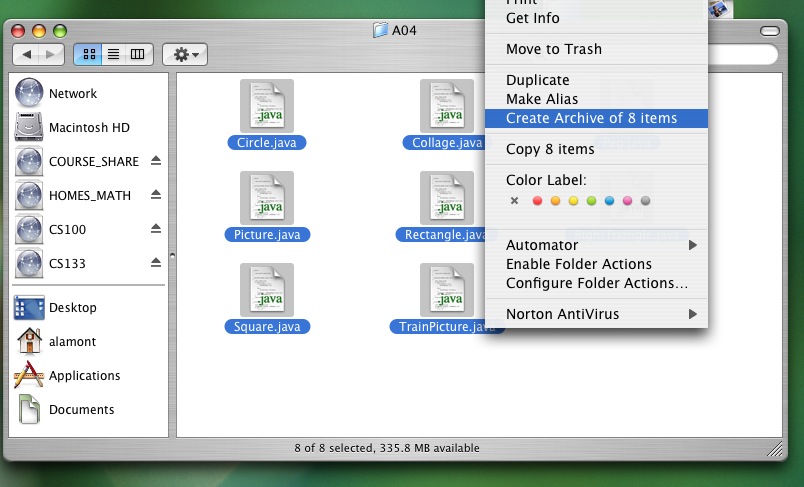
- Navigate to the folder with the files you wish to zip
- Select all the files you want to zip and control + click to bring up a
menu (or right click if you have that option)
- Choose
create archive from the menu.
- Rename the zip file with the correct name to be submitted.
Using Windows with Winzip
- Using
Windows Explorer select the files you would
like to put in the .zip file.
- Right-click on your mouse and choose the
Winzip-->Add to
               Zip file...
option.
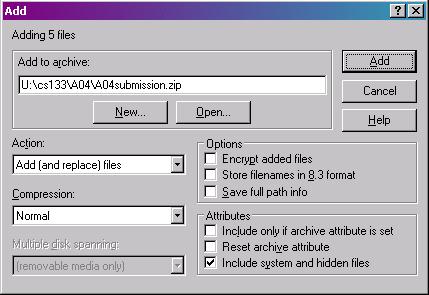
- Type in the path name and the name of the
.zip file
to be created. Be sure to that the Save full path info
option is NOT checked before hitting enter. The following dialog box
shows you an example of this step.
- Click Add.
Uncompressing files
On Mac, Stuffit Expander will handle these files automatically. On
Windows, Winzip will also be able to expand .zip files.
However, a very nice alternative is the open-source program 7-zip, which handles a large number
of compressed file types, including GZIP, BZIP2, ZIP and RAR.